iPhone app · coming soon

Text messages as evidence — in a document anyone can check.

For a custody case, a dispute with a landlord or an employer, an insurance claim or a police report: ProofPrint turns a conversation from Messages, WhatsApp or Telegram into one signed PDF, with every message numbered, real screenshots and a verification page. Made on your iPhone — your messages are not sent to us.

To present as evidenceTo keep your messages

Coming soon to the App Store Verify a document

Free sample from your own conversation. The full document is a one-time purchase — no subscription.

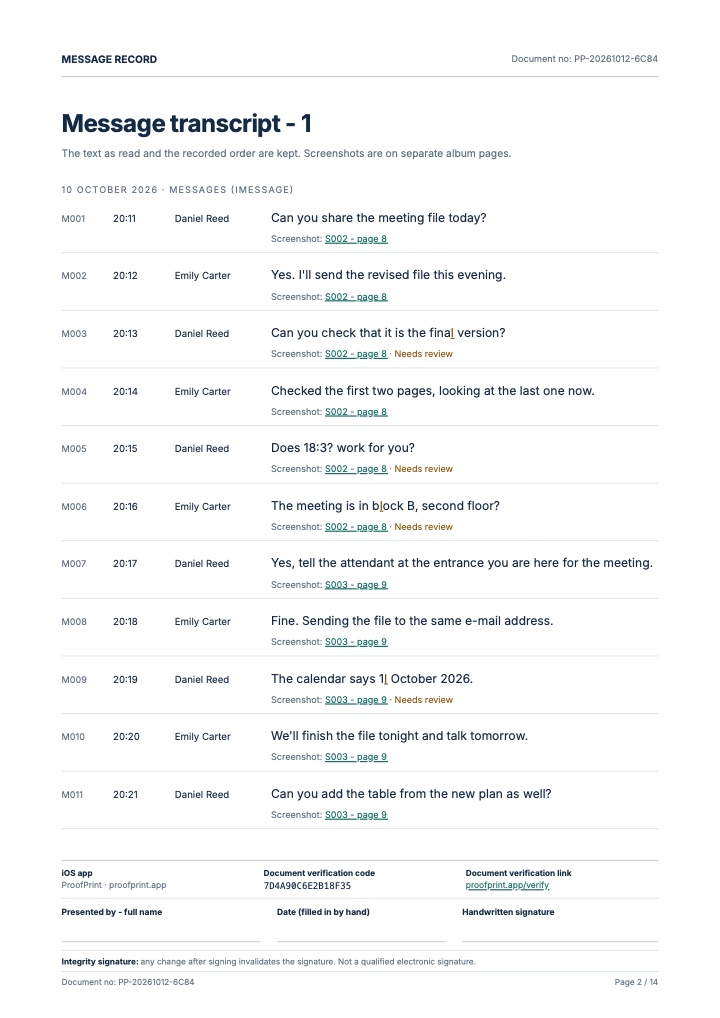
The transcript page of a sample document: numbered messages with sender, date and time
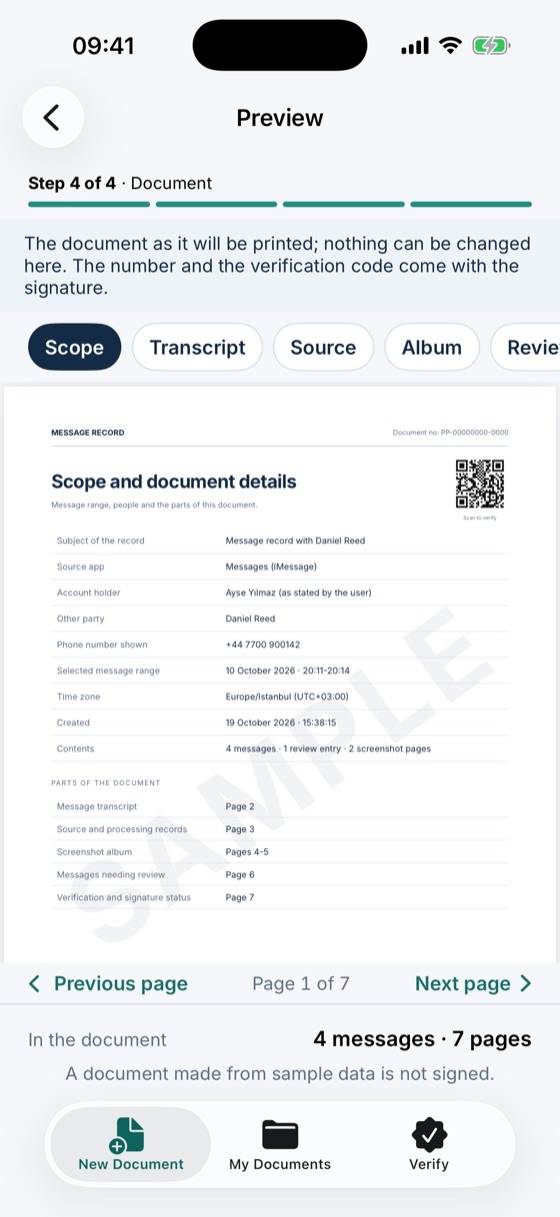
ProofPrint showing the preview of a document made from a sample conversation

What people use it for

Also

To keep your messages

A readable copy of a conversation that lasts: before you change phones or clear your storage, or to keep the messages of someone you have lost.

  • One PDF that opens on any computer and prints well — no app needed to read it
  • From WhatsApp and Telegram, the conversation as the export or your account holds it; from Messages, as far back as you scroll
  • Photos, videos and files in a separate media package
  • Still checkable years later: the signature shows it has not been changed

Read on your phone

Recordings and exports are read on the iPhone itself. No account, and the messages are never uploaded.

Signed when it is made

Any change to the file after signing breaks its integrity signature. An independent time stamp is added when it can be reached.

Checkable by anyone

The QR code opens the document’s record. The PDF itself is checked in the browser, without uploading it.

Bring the conversation from where it is

Three ways in. In each, the text is read on your phone and nothing in it can be edited.

Messages

iMessage and SMS. Record your screen while you scroll through the chat; ProofPrint reads the recording.

WhatsApp

The chat’s own export file. Add a screen recording if you want the real screenshots beside the messages.

Telegram

Sign in from the app and pick the chat: it comes straight from Telegram to your phone, through Telegram’s official API.

Four steps, all on your phone

The app shows where you are and roughly how long each step takes.

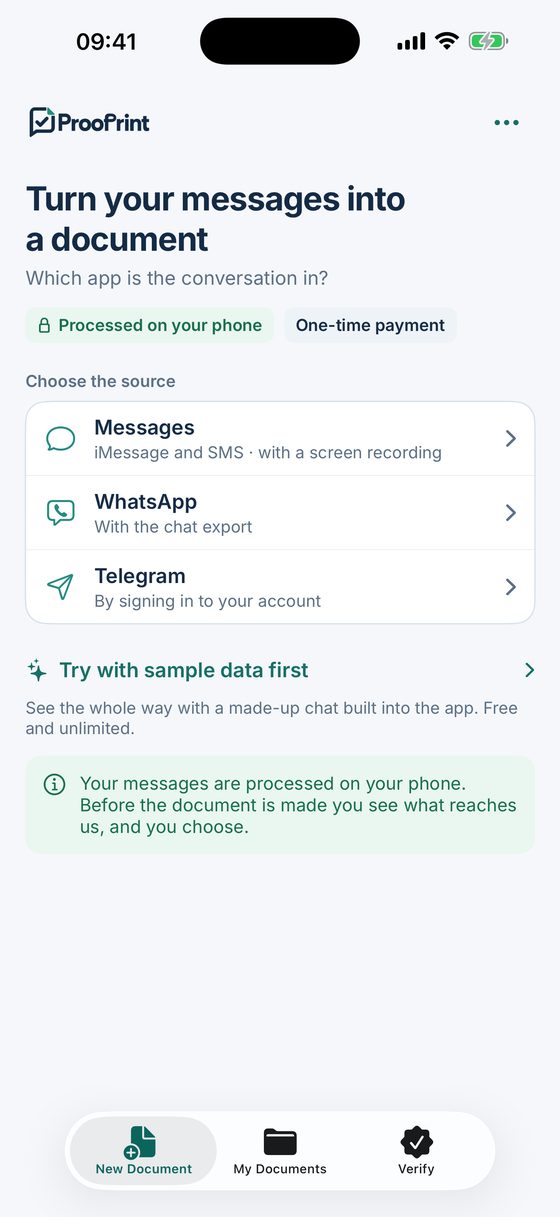
  1. Choosing the source: Messages, WhatsApp or Telegram

    1 / 4

    Source

    Choose the app the conversation is in, and hand it over: a screen recording, an export file, or your Telegram account.

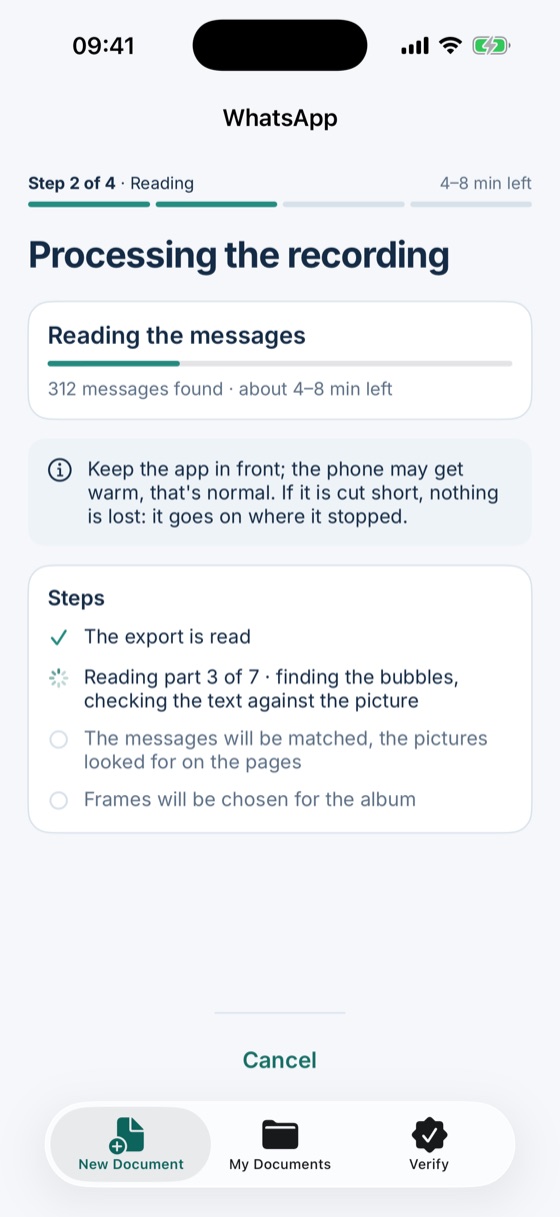
  2. Reading a recording: messages found so far and the time left

    2 / 4

    Reading

    Your iPhone reads the recording frame by frame and lines up every message with the screen it appeared on. It takes about as long as the recording, up to twice as long.

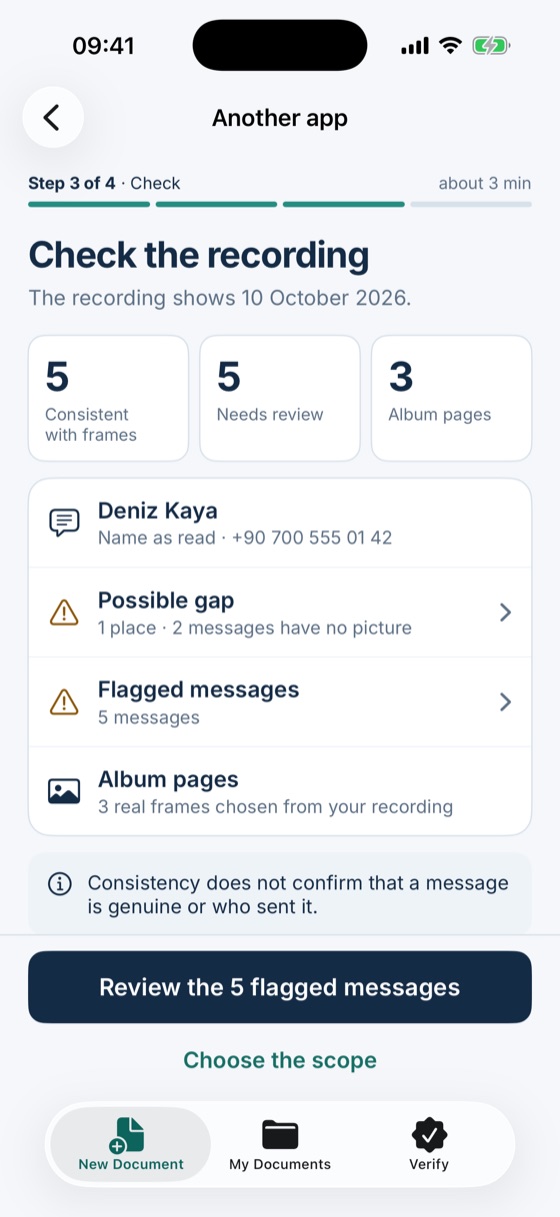
  3. The check: messages consistent with the frames, a possible gap and flagged messages

    3 / 4

    Check

    Before anything is made, you see what was read: messages consistent with the frames, places the recording may have skipped, messages that need review.

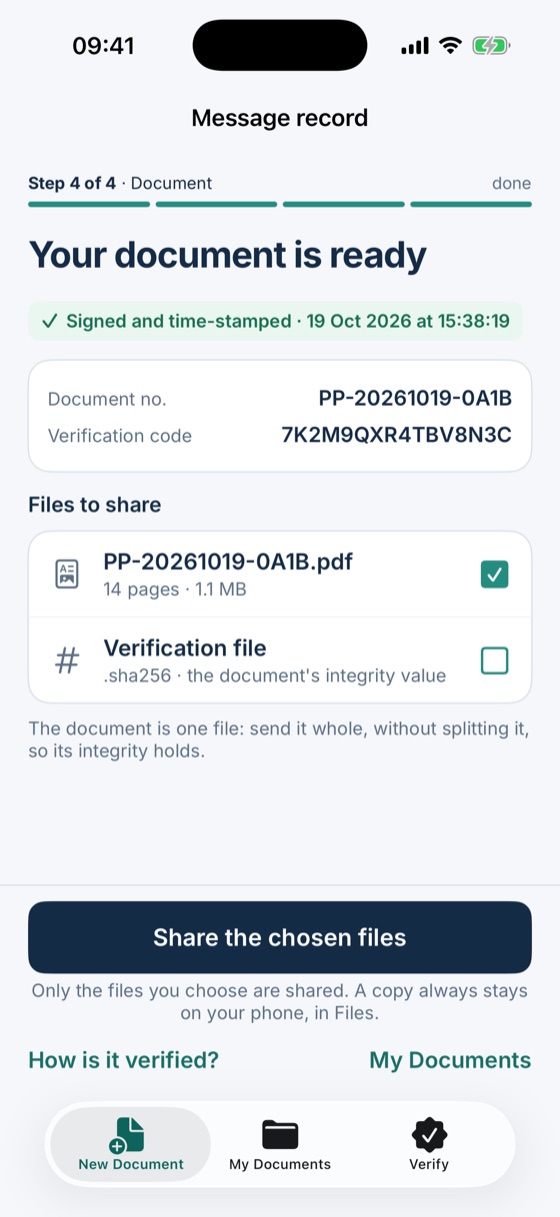
  4. The document is ready: signed, with its number and verification code

    4 / 4

    Document

    Choose the dates and the parts, look through every page, and sign. The PDF is yours, in Files.

One PDF, made to be printed and checked

A document that reads page by page on paper and still tells, online, whether it has changed.

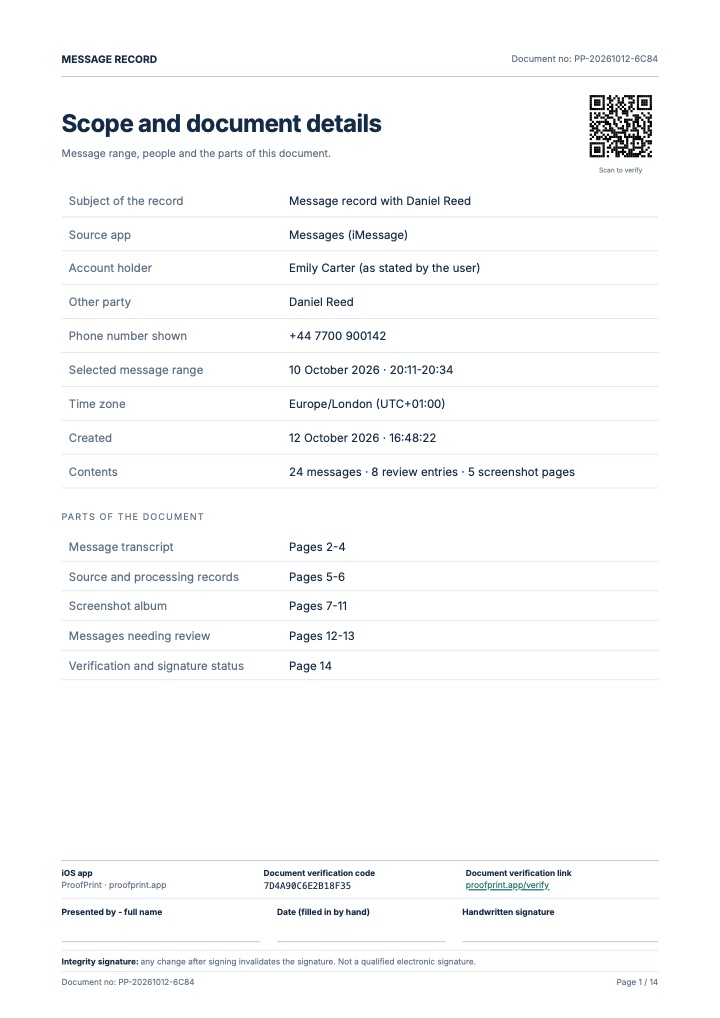
Scope and details page of a sample document

Scope and details

Whose conversation, which app, which days, which time zone — and what the document holds.

Transcript page of a sample document

Transcript

Every message numbered — M001, M002… — with sender, date and time, linked to the screenshot it was read from.

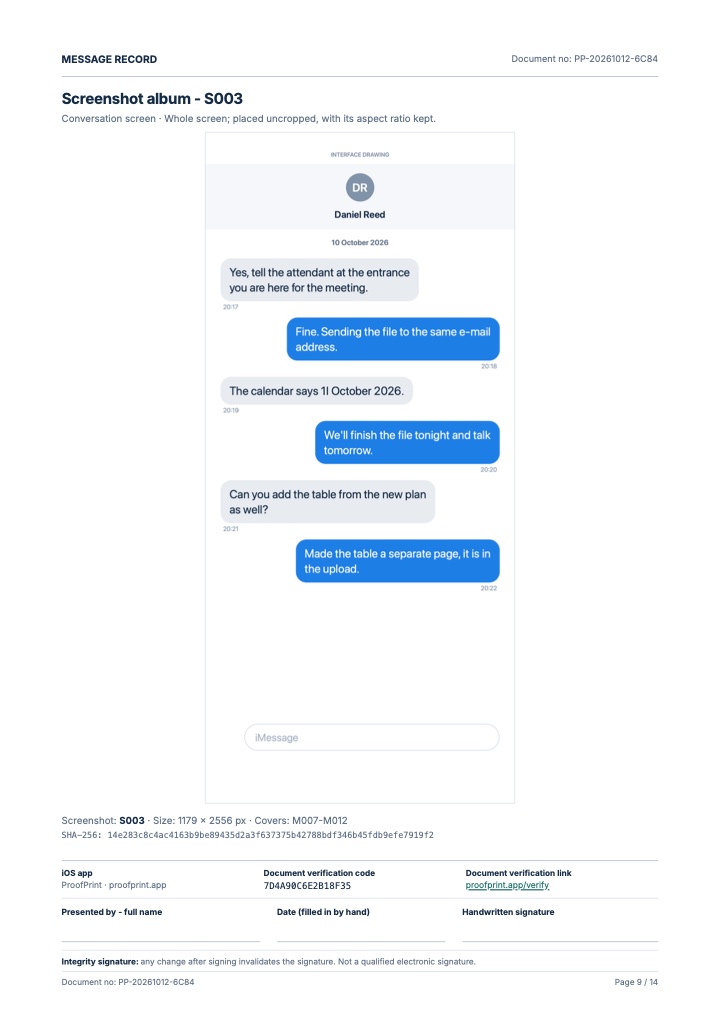
Screenshot album page of a sample document

Screenshot album

Real frames from your recording, untouched, each with its own fingerprint (SHA-256).

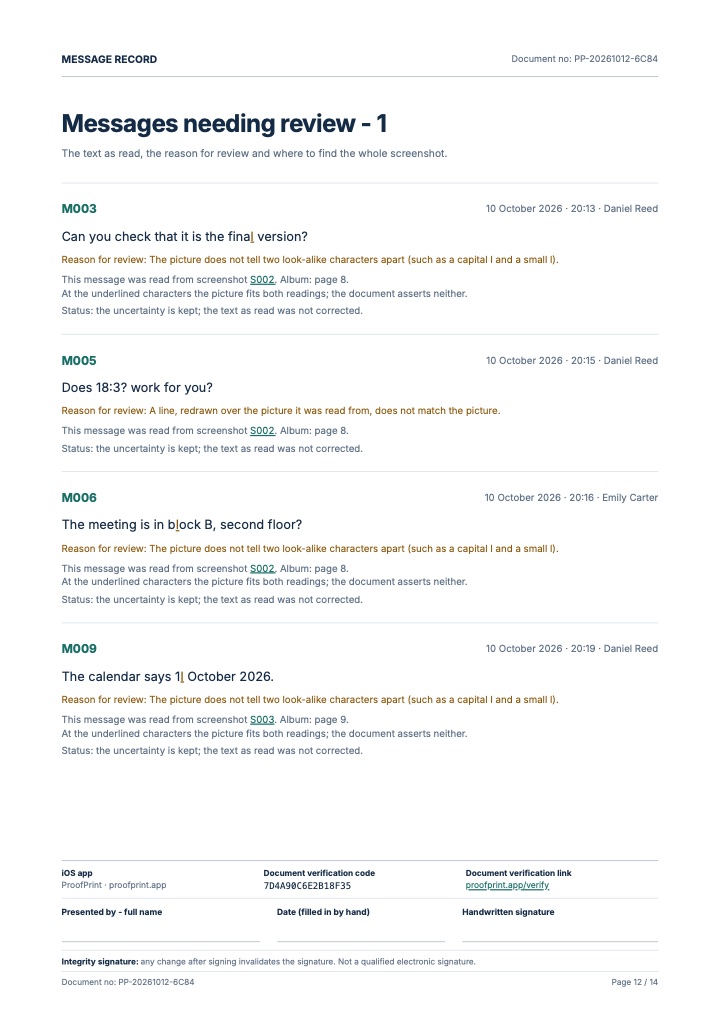
Messages needing review page of a sample document

Messages needing review

Whatever the picture cannot confirm is kept apart with its reason — never quietly corrected.

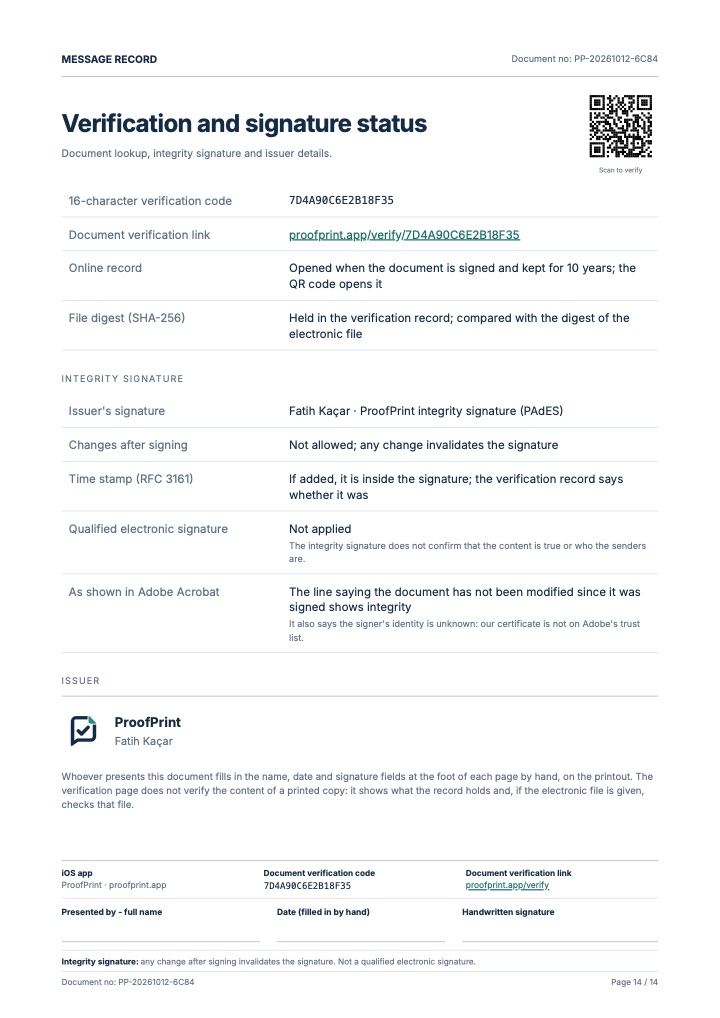
Verification page page of a sample document

Verification page

The verification code and QR code, and the state of the signature and the time stamp.

  • Source and processing records say how it was made: the method, the phone, the iOS and app versions, and a check for signs of jailbreak.
  • Photos, videos and files come in a separate media package; each file matches the fingerprint the document lists for it.
  • Every page carries the verification code, the link, and room for a handwritten signature.

Anyone can check it, without an account

The person you give the document to does not need the app, or to take your word for it.

  1. Scan the QR code on the first or last page, or type the 16-character code at proofprint.app/verify.
  2. See the record: document number, when it was signed, how many pages and messages it has.
  3. Choose the PDF. It is checked in the browser and never uploaded; if a single character changed, it shows.

Adobe Acrobat also shows that the document has not been modified since it was signed.

Open the verification page

Your messages stay on your phone

There is no account and nothing is read on a server. To sign a document, the app sends only what its record needs.

What reaches us

  • The document’s record: its number, verification code, signing time, page and message count, and fingerprints from which nothing can be read back.
  • If you allow it, at most 18 characters: the first and last three characters of three messages, so a printed copy can be compared. You see them before signing and can turn this off.
  • A key that shows the request comes from the real app on a real iPhone.
  • For the full document, a scrambled purchase ID and how many documents it signed this month.
  • Only if you choose to send one: a reading report, when the app does not yet know how a new version of iOS or of an app draws the conversation. It holds the reading’s counts, the app and iOS versions and the phone model, and an email address only if you write one. You see all of it before it goes.

What never does

  • The messages’ text beyond those 18 characters, names and phone numbers
  • Attachments, screen recordings and screenshots
  • The PDF itself
  • Your phone’s jailbreak check, and its model unless you send a reading report
  • An account, advertising IDs, third-party analytics
  • The record is kept for 10 years, or until you delete it from the app.
  • Telegram sign-in goes from your phone straight to Telegram; your password is not stored, and the session is closed when the document is made.
  • Documents you keep in iCloud Drive are stored by Apple, like any other file there.

What a document shows — and what it does not

It shows

  • That the file has not changed since it was signed.
  • Which messages are consistent with the frames of your recording, and which need review.
  • What your screen showed, in real screenshots.

It does not show

  • Who really sent a message, or that a message is genuine.
  • Messages deleted before you recorded, or that the recording never showed.
  • When the messages were sent: the time stamp dates the signing, not the conversation.

Try it free. Pay once.

Free sample

Four messages from your own conversation, as a watermarked PDF with every part of the document. Or walk the whole way with made-up sample data, as often as you like.

Questions

Who can I give the document to?

Anyone who needs to read the conversation: a lawyer, a court, the police, an insurer, an employer. They can read it on paper and check it at proofprint.app/verify. Whether it is accepted as evidence is for them to decide.

Can I use it just to keep my messages?

Yes. The document is a readable PDF that opens on any computer and prints well, with photos, videos and files in a separate package. Many people make one before changing phones, or to keep the messages of someone close.

Does ProofPrint read my messages on a server?

No. Recordings and exports are read on your iPhone. To sign the document, the app sends its record — numbers, counts and fingerprints — and, only if you allow it, at most 18 characters of three messages.

Can I correct a message that was read wrong?

No. The text cannot be edited by anyone. A message the screenshot does not confirm is kept apart, with its screenshot and the reason, so the reader can judge it.

What happens to my screen recording?

It stays in Photos, where you made it. ProofPrint reads its own copy and deletes that copy once the document is made.

Can I delete the verification record?

Yes, from the app, at any time. After that the code only says that the record was deleted; the signature in the PDF can still be checked.

Which phones does it work on?

iPhone with iOS 16 or later. There is no Android version.

Which languages?

The app and its documents are in English and Turkish; a phone set to another language gets English.

Make the document. Let anyone check it.

Coming soon to the App Store Try the verification page